
If you're active on different Discord servers, other members of those servers can send you direct messages by default. Discord offers global and server-specific settings for this. This guide describes the current menu path for desktop, browser, and mobile.
Disable direct messages for a single server
- Open the desired Discord server.
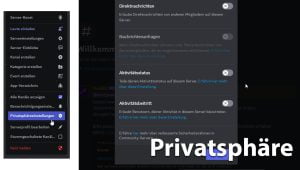
- Open the server menu and select Privacy settings.
- Disable there Direct Messages. Members of this server can then only message you if you are friends or have another permitted connection.
The screenshots previously embedded on this page have been removed because the files no longer existed and showed an outdated Discord interface.
Restrict direct messages in general
On desktop and in the browser, open the user settings via the gear icon at the bottom left. Then select Content & Social. In the social permissions section, you can Direct Messages disable, and decide whether the change should also apply to servers you have already joined.
On mobile devices, open your profile, then the settings, and then likewise Content & Social. In the server settings area, you can adjust the permission for direct messages globally or for individual servers.
Block individual people
If you only want to block a specific person, open their profile via the member list or the chat. Select in the three-dot menu Block and confirm the action. The person can no longer send you direct messages afterwards.
Use spam and content filters
Under Content & Social you can additionally configure the direct message spam filter and the filter for sensitive media. These filters do not replace blocking unknown senders, but they can move suspicious or unwanted content to a separate area or hide it.
Security notice: Do not open unexpected files, QR codes, or login links from direct messages. Server teams never need your password or your two-factor code for support or moderation.
Source and test bench
Last editorially reviewed on October 27, 2026. Based on the official Discord help article on Blocking and Privacy Settings. Menu labels may change with later Discord versions.



 German
 English